

NOTE: If u want update to 4.1 don't do that from iTunes, I AM WARNING YOU!!
Click here with Custom Firmware from Sn0wbreeze that won't upgrade your baseband to 05.14.02!
Read this!
The Dev-Team blog posted a warning advising unlockers not to install iOS 4.1, amid a flurry of reports indicating that the update will be available starting later today. Apple's UK site had posted a notice over the weekend - since changed to read "Coming soon" - that 4.1 would be "available on 8 September," and the Spanish site had a similar announcement. Regardless of the specific date, though, the Dev-Team is advising in the strongest terms against an upgrade. “Today you’ll likely start seeing iTunes innocently offer you a new version of iOS…version 4.1," the Dev-Team Blog says. Under a video clip from Return of the Jedi, the post warns "Don’t accept it…it’s a trap!”
The team's warning is particularly directed at new iOS device owners, who may not have any experience with the jailbreak cat-and-mouse game. "Not everybody knows that accepting new iOS updates is the surest way to lose your jailbreak and/or unlock,” as the post says. In particular, the expected baseband update will break carrier unlocks: "while those of you who have Cydia or TinyUmbrella backups of your FW hashes will always be able to get back to 4.0.1 if you make this mistake, this doesn’t hold for unlockers… there’s currently no known way to revert your baseband — if you update your baseband you’ll lose the ultrasn0w unlock, possible [sic] forever.” However, due to a flaw in very early bootloaders, “a tiny number of iPhone 3G owners” will be able to revert their basebands… and you know who you are.

iPhone 3G 3GS Hardware Problem Solution
iPhone 3G 3GS Hardware Problem Solution - The way you uncover all the iPhone 3G and 3GS problem with helpful pictures indeed.

Locate your lost and stolen computer
This is a trick to locate your lost or stolen computer if you face no more solution at all.

How To Enable Windows 7 Hidden Features
In windows 7, it has 5 features that are hidden. These features are completely come in handy for user.

How to open Office 2007 Files within MS office 97, XP and 2003
Alike to the conventional “.doc” files, “.docx” format consists of the supplementary formatting information as well as offers a compressed or in other words, it offers slighter size of the file.
GreenPois0n iOS 4.1 Jailbreak In FEW DAYS!!!!
Pretty good news for all! GreenPois0n jailbreak for all devices on iOS 4.1 will be released really soon in the next few days (probably less than a week). Ok, pod2g, the well know iPhone hacker behind SHAtter exploit to pwn all devices forever has replied someone who is asking about release date. The answer was cool to everyone!

the release date be count by days or week ?@pod2g replied:
I would say days.Another thing you have missed which confirms it's really soon. Chronic dev team member p0sixninja, the hacker behind GreenPois0n payload has just posted back SHAtter exploit on the iPhone wiki and saying The SHAtter Story Begins..


Sn0wbreeze 2.0.2 Released To Fix Error 17, 40 And Hacktivation Problems
iH8sn0w had released Sn0wbreeze, which is the Windows version of the PwnageTool foriPhone 3GS, iPhone 3G and iPod Touch users to update and jailbreak iOS 4.1.
But some users had encountered problems while hacktivating or while restoring custom iPhone firmware in iTunes.
iH8sn0w has just released Sn0wbreeze 2.0.2 to fix some of the hacktivation problems and error 17 and error 14 while restoring iPhone with the custom iPhone firmware created using Sn0wbreeze that were reported by users.
Sn0wbreeze 2.0.2 fixes the following problems:
- Error 17 when restoring with custom firmware
- Error 40 when restoring with custom firmware
- Hacktivation problems
To recap, Sn0wbreeze v2.0.2 supports the following devices:
- iPhone 2G
- iPhone 3G
- iPhone 3GS (old bootrom) — Requires you to be already jailbroken. (If you are the old bootrom on Spirituse Spirit2Pwn or Jailbreakbme use jbme2pwn available in the repo http://repo.woowiz.net repo)
- iPhone 3GS (new bootrom) — Requires you to be on 3.1.2.
- iPod Touch 2G (MB)
- iPod Touch 2G (MC) — Requires you to be on 3.1.2
- iPod Touch 3G — Requires you to be on 3.1.2
Sn0wbreeze 2.0.2 cannot jailbreak iPhone 4, iPod Touch 4G and iPadcurrently. iH8sn0w hopes to add support as soon as the details of the SHAtter exploit are released.
You can download the latest version of Sn0wbreeze from this link. iPhone 3G, and iPod touch 2G (MB) users should use iREB (download link) also developed by iH8sn0w to bypass the errors while restoring custom firmware in iTunes.
As always, please let us know how it goes.
[via iH8sn0w]
[UPDATE] Jailbreak 4.1 witih Sn0wbreeze 2 (Guide)
2.0.2 Update :)
Unfortunately Sn0wbreeze 2.0.1 has few bugs causing iTunes to throw an error 17/40 while using hactivate iPhone options of Sn0wbreeze 2.0.1. A quick fix for hacktivation issue was to uncheck the Activate Phone option in Expert mode and recheck it.
But if you haven’t jailbreaked iOS 4.1 yet then Sn0wbreeze 2.0.2 is the way to go. Download Sn0wbreeze 2.0.2 and follow jailbreak guides below.
Updated guide
Step 1: Download and install the latest version of iTunes.
Step 2: Now start iTunes and sync your iPhone with your PC so that it backs-up all your important data including settings, apps, music, contacts and photos.
Step 3: Download Sn0wbreeze 2.0 and the original iOS 4.1 firmware file. Move all these to your desktop.
Step 4: Start Sn0wbreeze and select “Simple Mode” for easy process.
Error 3194 on restoring 3GS – Solution/Fix
Many users who were trying to downgrade iOS 4 to 3.1.3 have been facing a 3194 error. This error occurs when users try to restore the iPhone 3.1.3 firmware while downgrading from iOS4. So is this issue fixable? Yes, please follow the below mentioned steps.
The problem actually lies with the fact that Apple signs the firmware now and you cannot upgrade or downgrade an iPhone using a firmware that Apple has not signed sign anymore, so this issue might go away if you use an older firmware which is signed by Apple. Once again, using an Apple signed firmware may not fix this issue and we are actively researching on things that would help users to downgrade their iPhone or iPod Touch running iOS 4 to iPhone OS 3.1.3.
ERROR 3194 SOLUTION / FIX:-Apple recently released the iOS4 firmware update for the iPhone 3G, 3GS and iPod Touch users. Users updated to the new firmware anticipating new features and improved performance. Nevertheless, for some of them the opposite occurred, especially for iPhone 3G owners. Most of the iPhone 3G users are reporting very slow performance and applications crashing. The main cause of this problem is the slow processor and the low amount of RAM in the iPhone 3G.Now there is no official way to downgrade to OS 3.1.3 from iOS4, but there is always an unofficial way. Here are the steps to downgrade from iOS4 to OS 3.1.3


Jailbreak iPhone 3GS, iPod Touch 2G and iPod Touch 3G on iOS 4.1 Using Sn0wbreeze [Guide]

iH8sn0w has released the new version of Snowbreeze 1.8 beta to jailbreak the iOS 4.1 beta for iPhone 3GS, iPod Touch 2G and iPod Touch 3G. It is to remind you that iOS 4.1 beta is released only for developers and many features are being expected in the upcoming iOS 4.1 final version like Game Center, Turning On/Off spell check etc.
Unlock iPhone 4: GreenPois0n Jailbreak can fix 5.14.02 baseband problems

It has come to our attention that many of you are encountering problems after updating your iPhone 4 device to a higher version, and then becoming stuck on the newer baseband when having downgraded.
Ultrasn0w Unlock for iPhone 3GS on iOS 4.1, 05.14.02 Baseband Delayed
Chronic Dev Team and iPhone Dev Team are working hard to bring you a simple usb-based jailbreak tool to jailbreak iOS 4.1 on all devices including iPhone 4, iPod touch 4G and iPad, also new Apple TV. Of course some of you have upgraded to iOS 4.1 without preserving baseband, the baseband has been updated to 05.14.02 for iPhone 3GS or 2.10.4 for iPhone 4.

How to Downgrade Your iPhone 3G Baseband Using Fuzzyband
These are instructions on how to downgrade your baseband to 2.28 for iPhone 3Gs with the 5.8 bootloader using Fuzzyband. This will allow you to unlock your iPhone 3G using YellowSn0w.
Fuzzyband is the preferred application for downgrading your baseband since it does version checking, downgrades all versions of baseband from 2.30.03 to 4.26.08 (3.0 beta5), and it reports the current bootloader version on screen.
Step One
Press to launch Cydia from your SpringBoard.

Fuzzyband is the preferred application for downgrading your baseband since it does version checking, downgrades all versions of baseband from 2.30.03 to 4.26.08 (3.0 beta5), and it reports the current bootloader version on screen.
Step One
Press to launch Cydia from your SpringBoard.
Put Windows XP on your PSP

This will show you how to put a set of webpages that look and work very similar to Windows XP onto your PSP. This "Windows XP" will work offline, so there is no need to connect to the internet to use it. All in all its an excellent idea and will certainly impress your friends. The files are only 1.5 MB in size and contain games and other programs associated with Windows XP.
- Connect your PSP to your Pc using the usb cable.
Get More Home Screens on Your iPhone Without Jailbreaking
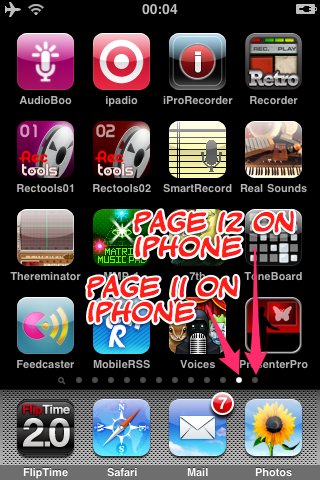 Apple has limited the number of home screens on the iPhone to 11. Even though that adds up to a total of 180 applications including the dock, some users want more space. This is possible on firmware version 3.1.2 thanks to a trick that doesn't require jailbreaking.
Follow these steps to get more than 11 home pages on your iPhone:
- Make sure you have 11 pages of apps. You can drag apps over to create a new page.
- Blank spaces are OK, but the first and last page must be completely full of apps (16 on each).
- Move the Voice Memos icon to the last position on the last page (all the way in the bottom right, but not in the dock).
- While the icons are still wiggling, move one icon up from the dock to bump the Voice Memos icon off the screen and replace it in the last position.
- Press the home button so the
New Features in iPhone iOS 4.2 Coming in November
Two months from now Apple will release iOS firmware 4.2 for the iPhone 4, iPhone 3GS and 3G. The new operating system unifies the iOS mobile operating system and iPhones and iPads (with the exception of the original iPhone) will finally be running the same version. Several new features are coming to the iPhone with the iOS 4.2 release.

Download & Install Themes on your iPhone
NOTE: Your iPhone must be jailbroken!
Please click here to see all the themes
1. Download WinterBoard from Cydia (If you already have winterboard installed then skip to step 3)


Free Download iPod-iPhone-iPad Firmware, iTunes, Jaibreaking tools

iOS 4.3.2
Direct Download Links for iOS 4.3.2 / 4.2.7 (Official from Apple)
iOS 4.3.1
iOS 4.3
iOS 4.2.1
iPad Firmware
iPhone 4 Firmware
iPhone 3G S Firmware
iPhone 3G Firmware
Introducing the iPhone 5
OK don’t get too excited, this is obviously a fake. There is no such thing as the iPhone 5, at least for the time being. I came across this image by accident on Twitter, via Bizarro Comic.
I think it’s pretty funny. My favorite features? The “pie on demand” and “get out of jail free”.

What are your favorites?
Downgrade iOS 4.0.2 To 4.0.1 iPhone 3GS Without Saved SHSH Blobs
Apple has released iOS 4.0.2 to fix the PDF exploit used by JailbreakMe 2.0 star, the ultimate jailbreak for all devices on iOS 4/ iOS 4.0.1 or iPad 3.2.1. Those of you who have upgraded to iOS 4.0.2 accidentally or had bought a new device which came with it, check our articles on how to jailbreak iOS 4.0.2 on iPhone 3G using Redsn0w 0.9.5b5-5 and jailbreak iOS 4.0.2 on iPhone 3GS using PwnageTool (unofficial).
If you are an iPhone 4 user, then you are left with no way to jailbreak and unlock iOS 4.0.2. Your only choice at this time is to downgrade iOS 4.0.2 to iOS 4.0.1 using your saved SHSH blobs. In case you are one of those who forgot to save your SHSH blobs or lost them, then here is some news for you. A guy by the name UndeadRevolution has posted a guide on PwnMyI Forum on how to downgrade iOS 4.0.2 to 4.0.1 without having your SHSH blobs saved.
Charging Phones without a Charger
Your phone battery can literally make or break your day. Imagine yourself expecting a very important call. Let us say - a big business deal. If your phone battery is fully charged, you feel more relaxed. You are ready to receive the call anytime. But when your phonebattery has just one bar remaining, you suddenly panic. Your phone may likely die any moment. And worse, you forgot you charger at home. Well, hold your horses. Your case is not hopeless. Here are some suggestions on how you can charge your phone battery without its charger:
- Rely on a laptop or a desktop to save your day.First, turn off your phone. If what you have around is a laptop, look for the USB cord. Use it to sync your unit into the laptop. When the connection is made, expect your phone battery to begin generating power from the laptop’s battery. No sweat, right? Note, however, that the charging process here is a bit slower. Bear in mind that you don’t have the luxury of being connected to a direct power source. Phone battery charging is certainly faster when you siphon off power from an outlet in your vehicle or from a wall socket. You should also see to it that the laptop is connected to a power source. You don’t want to create another hassle. You don’t what to drain the laptop’s battery while charging your phone battery.
Charging a BlackBerry with a Computer

A BlackBerry mobile phone is famous as a PDA device because it offers diverse applications like e-mail, personal calendars, camera and video, MP3 and MP4 players, Java application, computer games, and Internet via GPRS, 3G, or Wi-Fi. You can also multitask using a BlackBerry like you can listen to your favorite song in your MP3 player while you take some pictures that catch your interest. But your mobile phone’s battery will wear down quickly as you use your mobile phone’s special features. The great thing about BlackBerry is you can charge it using your computer or laptop. Below are steps and guides on how to charge a BlackBerry using your computer or laptop.
- Ensure that the battery of your computer notebook is charged. Your BlackBerry mobile will draw charge from your laptop even if your computer unit’s battery is not fully charged. You can also connect your computer to an electrical outlet so you can charge your Blackberry in your computer unit.
Subscribe to:
Posts (Atom)


