iPhone 3G 3GS Hardware Problem Solution
iPhone 3G 3GS Hardware Problem Solution - The way you uncover all the iPhone 3G and 3GS problem with helpful pictures indeed.
Locate your lost and stolen computer
This is a trick to locate your lost or stolen computer if you face no more solution at all.
How To Enable Windows 7 Hidden Features
In windows 7, it has 5 features that are hidden. These features are completely come in handy for user.
How to open Office 2007 Files within MS office 97, XP and 2003
Alike to the conventional “.doc” files, “.docx” format consists of the supplementary formatting information as well as offers a compressed or in other words, it offers slighter size of the file.
How to: Jailbreak any iPhone, iPod, or iPad [Using Spirit]
ondering What's Jailbreak, and How it can be Done? you heard a lot about Jailbreaking and it seems like a dangerous process, Here's a guide for What you need about Jailbreaking any Device ..
How to: Jailbreak iPad 3G on iOS 3.2.1 using JailbreakME 2.0
tep 1: Just navigate your Safari Browser to http://jailbreakme.com and it will show you "Slide to Jailbreak", just touch and slide to jailbreak
Step 2: You will have a jailbroken iPad after minutes of some processes.
Jailbreak iPad iOS 3.2.2 with Limera1n [How to Guide]
STEP 1: Download Limera1n jailbreak (Links at the end)
STEP 2: Connect your iPad to your computer via USB.
STEP 3: Double click limera1n.exe file from the desktop, then click "make it ra1n".
How to: Jailbreak iPhone, iPod Touch on iOS 4 with Redsn0w
The iPhone Dev Team has surprised as with a new version of Redsn0w 0.9.5 but this time it Enables Multitasking. This new version can jailbreak your iPhone 3G, and iPod Touch working on iOS 4 and also it can enable Multitasking and wallpapers, To do so follow the step by step guide after the jump..
What you need:
iOS 4 installed on your Device (iPhone 3G/ iPod Touch 2G) from Here.
iTunes 9.2 beta from Here.
Redsn0w 0.9.5 from Here.
Steps:
Step 1: Connect your Device to Mac via USB
Jailbreak iPod touch 2G (MC & Non-MC Model) on iOS 4.1 with GreenPois0n [Mac & Windows Guides]
GreenPois0n is available for Windows, Mac and Linux operating systems, to jailbreak iPhone 4/3G, iPod touch 4G/3G on iOS 4.1 and iPad on iOS 3.2.2
Jailbreak for iPod touch 2G (MC & Non-MC Model) procedure is the same as the last release. You can follow our full step by step guides:
- Jailbreak Guide for Windows posted here.
- Jailbreak Guide for Mac posted here.
Download iOS 4.1 fro iPod 2G (MC and Non-MC Model)
Download GreenPois0n for Mac OS X
Download GreenPois0n for Windows
Jailbreak iPhone 4, 3GS, iPod touch 4G, 3G on iOS 4.1 with Greenpois0n on Mac OS X [How to Guide]
STEP 1: Download Greenpois0n jailbreak (link at the end)
STEP 2: Connect your iPhone/iPod to your computer via USB then launch Greenpois0n jailbreak application and hit "Jailbreak" button.
Jailbreak iPod Touch 4G, 3G on iOS 4.1 with Greenpois0n [How to Guide]
STEP 1: Download Greenpois0n jailbreak (link at the end)
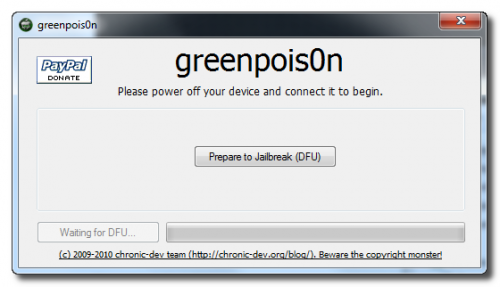
STEP 2: Connect your iPod to your computer via USB then launch Greenpois0n jailbreak application and hit "Prepare to Jailbreak (DFU)" button.
STEP 3: Follow the steps shown on the next screen shots to put your device in DFU mode.
- Now you have to press and hold the sleep button for 2 seconds.
Jailbreak iPhone 3GS (New Bootrom), 3G, iOS 4.1 with Sn0wbreeze 2.0.2 [How to Guide]
Compatible devices & notes:
- iPhone 2G — No Jailbreak Needed
- iPhone 3G — No Jailbreak Needed
- iPhone 3GS (old bootrom) — Requires you to be already jailbroken. (If you are the old bootrom on Spirit or JailbreakMe use Spirit2Pwn on http://repo.woowiz.net repo)
- iPhone 3GS (new bootrom) — Requires you to be on 3.1.2
- iPhone 4 — Wait for SHAtter exploit, and GreenPois0n jailbreak
- iPod Touch 1G — No Jailbreak Needed
- iPod Touch 2G (MB) — No Jailbreak Needed
- iPod Touch 2G (MC) — Requires you to be on 3.1.2
- iPod Touch 3G — Requires you to be on 3.1.2
- iPod Touch 4 — GreenPois0n jailbreak
- iPad — GreenPois0n jailbreak
Step 1: Download and install the latest version of iTunes.
Step 2: Now start iTunes and sync your iPhone with your PC so that it backs-up all your important data including settings, apps, music, contacts and photos.
Step 3: Download Sn0wbreeze 2.0.2 and the original iOS 4.1 firmware file (download links at the end of the page). Move all these to your desktop.
Step 4: Start Sn0wbreeze ( please note that when used Win Vista or Windows7 , you need to start your application in Administrator mode , by clicking the right mouse button on the icon and selecting "Run as administrator" ) and select “Expert Mode” for easy process, then click the blue arrow to continue.
Jailbreak iPhone 4, 3GS on iOS 4.1 with Greenpois0n [How to Guide]
STEP 1: Download Greenpois0n jailbreak (link at the end)
STEP 2: Connect your iPhone to your computer via USB then launch Greenpois0n jailbreak application and hit "Prepare to Jailbreak (DFU)" button.

How to: Jailbreak iPhone 4 on iOS 4 / 4.0.1 using JailbreakME 2.0
Jailbreak iPad 4.2 iOS with Sn0wbreeze CONFIRMED
We are about to see iOS 4.2 that will satisfy all iPad users as it adds tons of new features including app-switch in background with new style. So, while we are waiting for iOS 4.2, iPhone hacker behind Sn0wbreeze has published a screenshot showing that he has managed to jailbreak iPad on iOS 4.2. In case you don't know, iOS 4.2 is still in beta releases, the latest one is beta 3 which brought lots of new features.
The screenshot above shows full root access using MobileTerminal on iOS 4.2 Beta 3 for iPad. Sn0wbreeze 2.1 will support the following devices (the same as PwnageTool 4.1 but for Windows):
Sn0wbreeze 2.1 Support All iOS 4.1 Devices [SCREENSHOTS]
Today is very important day in jailbreak community as we started this day by new Geohot's untethered exploit then PwnageTool 4.1 for Mac OS X screenshot and now iH8sn0w posts new screenshots of Sn0wbreeze 2.1 for Windows to support all iOS devices running iOS 4.1 (the same as PwnageTool but for Windows).
Sn0wbreeze 2.1 will bring support to the following devices:
- iPhone 4, iPhone 3GS (new bootrom), iPhone 3G on iOS 4.1
- iPad on iOS 3.2.2
- Apple TV 2G on iOS 4.1
- iPod touch 2G, 3G, 4G on iOS 4.1
All Jailbreak and Unlock Guides for iPhone, iPod and iPad
The last few weeks we got three jailbreak tools for iOS 4.1 on iPhone 4, 3GS, 3G, iPod touch 4G, 3G, 2G and iOS 3.2.2 on iPad (i.e. Limera1n, GreenPois0n and PwnageTool), in addition to the presence of other jailbreak tools for all several iOSs, all this has led a confusion among iDevices users, so I decided to collect all iOSs, jailbreak guides and unlock guides for all existing iDevices in one article. Check them after the jump.
iPhone 4 | iOS | Baseband | Jailbreak Guide | Unlock Guide | Jailbreak Compatibility |
![]() | 2.10.04 | ||||
01.59.00 | |||||
01.59.00 | Through Safari (Web based) | ||||
Notes: · iOS 4.1 can be unlocked while preserving the baseband. · Latest version for iPhone 4 is iOS 4.1 · All jailbreak above are untethered jailbreaks. · You have to jailbreak your device with one tool only. | |||||
iPhone 3GS | iOS | Baseband | Jailbreak Guide | Unlock Guide | Jailbreak OS Compatibility |
![]() | 05.14.02 | ||||
05.13.04 | |||||
05.13.04 | Through Safari (Web-based) | ||||
Notes: · iOS 4.1 can be unlocked while preserving the baseband (PwnageTool only). · Latest version for iPhone 3GS is iOS 4.1 · All jailbreak above are untethered jailbreaks. · You have to jailbreak your device with one tool only. | |||||
GreenPois0n and Redsn0w Jailbreak Source Code is Going to be Open Source
Here's some great news for jailbreak lovers! GreenPois0n and Redsn0w jailbreak tools will be open sources for all people for free. This means that you will be able to use the source and customize it on your own or may be improve it to make it better than before while adding some interface and designs to the tool. This was confirmed by both iPhone and Chronic Dev Teams.
MuscleNerd of iPhone Dev Team posted on his Twitter account:
@Chpwn redsnow will be open source soon :)Also p0sixninja of Chornic Dev Team confirmed that GreenPois0n will go open sourced:
p0sixninja: Greenpois0n components will be updated/open sourced as soon as it’s out of beta.In case you don't know, GreenPois0n was released early this month based on Limera1n's exploit. Jailbreak iPhone 4, 3GS, iPad and iPod touch using GreenPois0n.
While Redsn0w is used to jailbreak iPhone 3G and iPod touch 2G on iOS 4.1 and it supports iOS 4.2 beta. Jailbreak iPhone 3GS, and iPod touch 2G using the latest version 0.9.6 of Redsn0w.
How to: Unlock iPhone 3GS on iOS 4.1 Using Ultrans0w
After releasing the new iOS 4.1, we showed you yesterday how to jailbreak your iPhone 3GS running iOS 4.1 using PwnageTool method, today I will show you how to unlock your iPhone 3GS on iOS 4.1 with ultrasn0w to use it with any carrier.
STEP 1: You should have a jailbroken iPhone 3GS on iOS 4.1 using PwnageTool ONLY, you can follow the step by step guide to jailbreak iPhone 3GS on iOS 4.1 posted here.
STEP 2: After Jailbreaking, Navigate to Cydia Source by Going to Cydia --> Manage --> Sources.
Download iOS 4.1 Custom Firmwares iPhone 4 / 3GS / 3G
STEP 1: Download the iOS 4.1 custom firmware for your device at the end of the page. Also download and install iTunes 10.
STEP 2: Join the splited custom firmwares you downloaded using BetterZip for Mac OS X or HJSplit for Windows to make them only one .IPSW file.
STEP 3: Start iTunes and put your iPhone into DFU mode by following this steps:
- Hold Power and Home buttons for about 10 seconds
- Then release the Power button but without releasing the Home button for 10 more seconds
- Your device should now be into DFU mode
STEP 4: Now, You will have to restore your iPhone to the jailbroken custom firmware by Clicking on the iPhone icon on the left sidebar of iTunes then hold left “alt” button (“Shift” button on Windows) on the keyboard and then click on “Restore” then release the alt button, now Select the custom firmware you already download and let iTunes go in a bunch of process.
STEP 5: After your iPhone is restored and jailbroken successfully. Follow our guide posted here to unlock iPhone 4, iPhone 3GS and iPhone 3G using Ultrasn0w carrier unlock.
iPhone 4 Custom Firmware, Activated [File 1, File 2, File 3]
iPhone 3GS Custom Firmware, Activated [File 1, File 2]
iPhone 3G Custom Firmware, Activated [File 1, File 2]
Firmware Changer Lets You Change Your Firmware Version to iOS 4.1 Without Updating
If you care about changing your iOS version visually on your iPhone for some reason, then you can useFirmware Changer instead of editing .plist files and making a complicated process. Firmware Changer will not let you update to iOS 4.1 but it will fake to be on iOS 4.1 or any other version.
You may want to change your firmware changer so that iTunes doesn't annoy you with the update message or may be to install some app that works only on iOS 4.1. Anyway, Firmware Changer is a free tweak available in Cydia via ModMyi repository.
Jailbreak iOS 4.1 on All Devices with PwnageTool 4.1 [GUIDE]
STEP 1: Download & install the latest version of iTunes & make sure your device is not on iOS 4.1 (links at the bottom).
STEP 2: Start iTunes, connect your device to your computer via USB and sync your iPhone then back your data.
STEP 3: Start PwnageTool and select your devices (iPhone 4 used in this guide).
Untethered Jailbreak Guaranteed for All Future Firmwares on iPhone 4, iPod Touch 4, iPad and Apple TV 2G
Think we’ve figured out a way to extend PwnageTool+limera1n+@comex hacks to untethered JBs for all future A4 firmwares :)Thanks Dev-team for hard work and the guarantee of having untethered jailbreaks for life time. So that Apple will not be able to patch them if it did not upgrade its A4's hardware. We did not catch more news but we let you informed with all immediate updates, Stay tuned.
Subscribe to:
Posts (Atom)