iPhone 3G 3GS Hardware Problem Solution

iPhone 3G 3GS Hardware Problem Solution - The way you uncover all the iPhone 3G and 3GS problem with helpful pictures indeed.

Locate your lost and stolen computer

This is a trick to locate your lost or stolen computer if you face no more solution at all.

The Beauty of Mathematics

See how the Mathematics works with all the awesome numbers.

How To Enable Windows 7 Hidden Features

In windows 7, it has 5 features that are hidden. These features are completely come in handy for user.

How to open Office 2007 Files within MS office 97, XP and 2003

Alike to the conventional “.doc” files, “.docx” format consists of the supplementary formatting information as well as offers a compressed or in other words, it offers slighter size of the file.

New Google Goggles For iPhone / Android, Searching the Images [VIDEO]

he next generation search is in our hands, the new "Google Goggles" app which is a great creation by google and this may also boosts the google searches to an extent. What is this new Google Googles do is to recognize the pictures we take around us starting from monuments, books, buildings to cars and more! it can also scan that picture and give you the web results of that one you have taken.
Another good thing about Google Goggles that it also recognizes voice search. This great Goggle search is very interesting and useful, if you are not aware of anything just take the picture of that thing and it will show you the relevant search result for that object.

Google experimented “Google Goggles” and here is the video of that Experiment:


You can download this App for Android or iPhone from the link given below directly:

Download Google Googles for iPhone / Android

17-Year Old Boy Made $130,000 from Selling White iPhone 4s

Fei Lam, a 17-year old high school senior and gadget nerd, New Yorker, made $130,000 during 6 months from selling white iPhone 4s. He was buying up some white iPhone 4 parts and putting his own conversion kits together.
Everything was were till yesterday when Lam received an ominous letter.
I got an email from a private investigator accusing me of selling stolen goods, which I'm 100 percent sure is not the case. They are some kind of anti-counterfeit/trademark firm, which sounds ridiculous, similar to what Apple is bringing up to remove White iPhone 4 Listings on eBay. I don't know how this legal stuff works.
Lam is looking for a lawyer and this little guy can't deal with this problem. Anyway, I think it's legal to do something like that. Good luck little kid! [Observer, via 9to5mac]

Twitter for iPhone 3.2 Brings Push Notifications, iOS 4.2 Compatibility and More !

Twitter app should be updated a long while ago to get push notifications and fix iPad errors. So, as announced on the official Twitter blog, push notifications for messages and mentions have been enabled in the app. The updated also includes Retina graphics to the iPhone and geotagging with “one tap”.
When you’re out and about, your phone probably isn’t always in front of you. It might be in your pocket or purse or on a table – perhaps with the screen off. We want to make sure you see important Tweets even when you’re not looking at Twitter at the moment. To help with that, today we’re launching push notifications for mentions.

In addition to mentions, we’re also bringing push notifications for Messages to Twitter for iPhone, as we’ve already done with SMS and Twitter for Blackberry.

The app now is compatible with iOS 4.2 and it brings some imporvments for iPad's one. Check the full chanelog below:
iPhone:
- Improved display of shortened URLs
- Correctly load reserved Twitter.com paths, such as http://twitter.com/newtwitter
- Fix connection error caused by a device clock being set incorrectly
- Additional retina graphics
- Enable geotagging in your account with one tap

iPad:
- Inline media
- Manage saved searches
- UI improvements
You can get the app directly from your iOS device from the App Store or download it directly from the link below:

Download Twitter for iPhone, iPad and iPod touch [iTunes Link]

RIM Attacks Apple -- Puts PlayBook VS. iPad in Browser Test [VIDEO]

Today RIM (Research in Motion) posted a side-by-side video of their PlayBook vs. Apple’s iPad to show the browsing ability and speeds the PlayBook has to offer. There were three different tests, they tested both of them in raw web-site rendering, Acid3, and Java. The results are very exciting and unbelievable.
RIM's Playbook loads pages faster than the iPad and has full flash capabilities considerig you don't have Flash on iPad. 


So, Apple, let's hope we see iPad 2nd generation versus this RIM's Playbook as the two devices will be in the same level of technician. 

Oh, forgot to tell you that Jim Balsillie, Co-CEO of Research In Motion said in an interview at the Web 2 Summit in San Francisco that unlike Apple, “you don’t have to go through a closed platform of an SDK. You don’t need an app for the web.” What do you think? [via TiPB]

The Beatles Now on iTunes

Apple has announced its "Tomorrow is just another day. That you'll never forget" surprise which is the Beatles music library, Apple has replaced the campaign logo with the Beatles one. The songs is now available to download through iTunes.
Here is what Apple says:
We’re really excited to bring the Beatles’ music to iTunes,” said Sir Paul McCartney. “It’s fantastic to see the songs we originally released on vinyl receive as much love in the digital world as they did the first time around.”

“I am particularly glad to no longer be asked when the Beatles are coming to iTunes,” said Ringo Starr. “At last, if you want it—you can get it now—The Beatles from Liverpool to now! Peace and Love, Ringo.”

“We love the Beatles and are honored and thrilled to welcome them to iTunes,” said Steve Jobs, Apple’s CEO. “It has been a long and winding road to get here. Thanks to the Beatles and EMI, we are now realizing a dream we’ve had since we launched iTunes ten years ago.”

“In the joyful spirit of Give Peace A Chance, I think it is so appropriate that we are doing this on John’s 70th birthday year,” said Yoko Ono Lennon.

“The Beatles on iTunes—Bravo!” said Olivia Harrison.

“The Beatles and iTunes have both been true innovators in their fields,” said EMI Group CEO Roger Faxon. “It’s a privilege for everybody at EMI to work with Steve Jobs and with Apple Corps’ Jeff Jones and their teams in marking a great milestone in the development of digital music.
Albums are now available for download at $ 149.00. but I wonder, is this all your expectations from this campaign?

Official Google Voice App Finally Hits the App Store

Google Voice app for iPhone has just arrived the app store, With this native app, you’ll continue to have access to all the major Google Voice features on your iPhone. let's check out them.

Google Voice app features:
  • Cheap rates for international calls
  • Free text messaging to U.S. numbers
  • Voicemail transcription
  • Display your Google Voice number as caller ID when making calls
  • With push notifications, the app will alert you instantly when you receive a new voicemail or text message
  • Most of your calls will be placed via Direct Access Numbers, making them connect just as quickly as regular phone calls
Download Google Voice app (for free) for iPhone [iTunes link]

Is this the Verizon White iPhone 4?

I have just been tipped off via mail about Verizon iPhone 4 – a white iPhone 4 tweaked to work as a Verizon white iPhone 4 without antennagate problem that iPhone 4 users faced when it was announced.

Take a quick look at the picture below. This photo proves iPhone 4 antenna design update is rolling-out with Verizon network? Let us know what do you think?
Click here for full resolution shoot
What's on the image?
1. The lack of a SIM card slot (Verizon doesn’t use SIM cards)
2. A new antenna design (Goodbye Antennagate)
3. The Verizon symbol as a network in the upper left of the screen.

UPDATE: I know that it might be (probably) fake, at least it brings the real specs of the Verizon iPhone 4. Let's hope it's not fake.

How to check iPhone Bootloader version (Windows) | Step-by-Step Guide

In this iPhone guide you will learn how to check your iPhone Bootloader version. This guide is for Windows users only.
We will use BBUpdaterExtreme in this guide. A few days ago we reported about a bug found by GeoHotz that leads to Unlocking iPhone 3G over firmware 2.2.1. GeoHotz reported that iPhone owners having Bootloader 5.8 are able to downgrade their Baseband from 2.30 to 2.28which leads to unlock your iPhone 3G 2.2.1 using iPhone Dev-Team YellowSn0w. So, lets learn how to check iPhone Bootloader version.
This guide is for all those who have updated their iPhone 3G to firmware 2.2.1 hence upgraded to Baseband 2.30.
Prerequisites
  • You need to jailbreak your iPhone
  • Mobile Terminal (available under Terminal Support section in Cydia)
  • OpenSSH (available in Cydia)
  • Download WinSCP
  • Download BBUpdaterExtreme (put in on Desktop for quick access)
Someone Suggested that:
Turbo sim should be taken-off while executing query in Mobile Terminal. I say this because our 3G kept rebooting before I could get my eyes on the results. Only after taking off the turbo sim and leaving carrier sim, could we capture a snapshot of the results.
Step 1
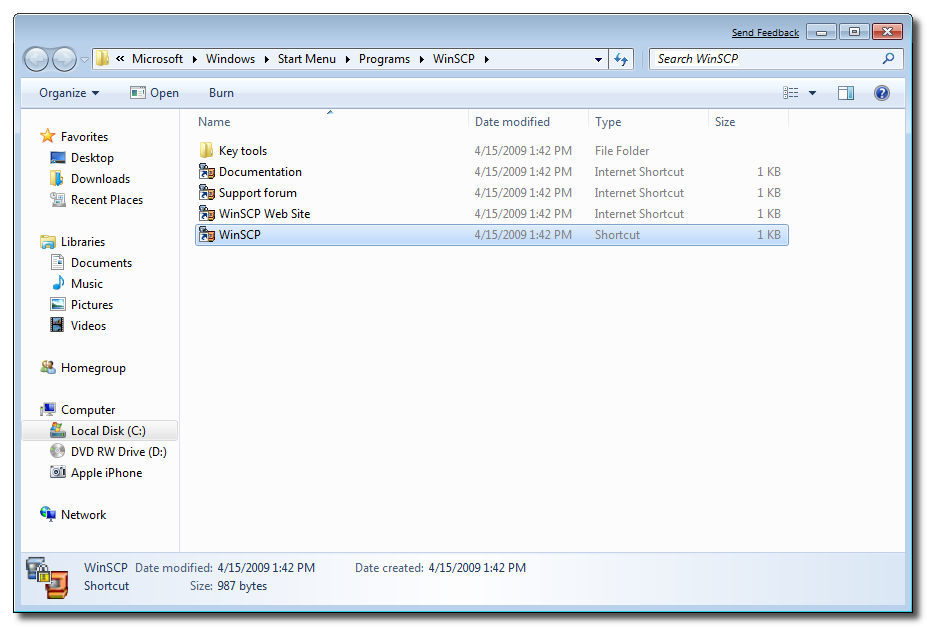
After installation, run the WinSCP available in Start menu under Programs.
how-to-check-iphone-bootloader-version-01
Step 2
Connect your iPhone to your PC and Check the IP address of your iPhone. Just make sure the iPhone and your PC to

A Peek Inside Steve Jobs' Home Office

Ever wondered how Steve Jobs' home office looks like? Do you think that he is sitting in a modern room with a perfectly modern disk? Nope. Jobs' home office looks like mine and yours and it may be worth.

Diana Walker in 2004 has taken some images were posted on All About Steve Jobs. Inside Steve Job's home office in Palo Alto. You can see in the pictures below a 24-inch screen showing Jobs' son on the screen. Lots of things to learn from this guy, he is one of America’s self-made billionaires, and thanks TNW for spotting this.


Everything You Need to Know About the New Facebook Messages

Mark Zuckerberg has announced at Facebook's press event today a new messaging system which sums up real-time chat, email, SMS, other chat clients. So get ready for your@facebook.com address.

Facebook Messages system is not a regular mail, there are no subject lines, no CC or BCC. You can send a message just by hitting the Enter key. It's going to feel like chat. A lot of times, it's going to be chat (ops!). It allows messages with more seamless, informal, immediate, personal, simple, minimal and short way, CEO & Founder Mark Zuckerburg said.

How to get it? You don't need to create a new account, Facebook mail will use your current public vanity URL. In case you have a username http://facebook.com/username, you will be able to register with the same username as username@facebook.com. The revamped Facebook Messages will be rolled out to the social network’s 500+ million users over the next few months.

In case you don't like waiting, you can request an invite by navigating your browser to this linkand simply hit Request and you will receive an invite soon. You can also try following @FBeMailon Twitter to score some invites.

And yes, as Zuckerberg quoted, This is a messaging experience that includes email as one part of it.

Another great thing I forgot to mention in my post that it almost comes to all the mobile platforms including the iPhone users. We expect an update soon for Facebook for iPhone app with the all new unified messaging system. But will you really give up your Hotmail, Gmail or Yahoo? Let us know!

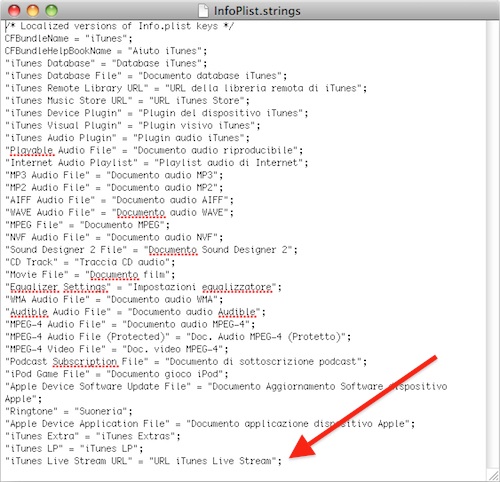
Here Comes “iTunes Live Stream” Tomorrow

So, is iTunes Live Stream is the announcement that we'll never forget? An Italian blog has found a code inside the newly released iTunes 10.1 files which references to “iTunes Live Stream” event tomorrow. We're still not sure as it might be just a feature.
MacRumors suggesting that it might be a video-related feature as Apple recently deployed its own HTTP streaming solution for Apple devices by live streaming the latest Steve Jobs’ keynotes. For myself, I hope it's iOS 4.2 tomorrow.

Apple to Announce Something “You'll Never Forget” Tomorrow

pple has just updated the status over Apple's official website with a very interesting message.
Tomorrow is just another day.

That you’ll never forget.

Check back here tomorrow for an exciting announcement from iTunes.
So, what should we expect Apple? the much waited iTunes cloud? iOS 4.2 release? App Store of the new Apple TV? or just text and screenshots? Anyway, we’ll check back tomorrow at 7 AM PST (check your local time here).

[Thanks Joguego for hat tip via Twitter]

PS Jailbreak Gets Support for PS3 Firmware 3.42, 3.50 and Beyond!

Guys over PS Jailbreak has just announced that PS Jailbreak Mod Chip now supports firmware 3.42, 3.50 and beyond. The PlayStation 3 firmware version 3.50 was supposed to be the one to really protect the console but PS Jailbreak gets support for this one.
We already have full how to guide to jailbreak your PS3 using PS Jailbreak Mod Chip so you can create backups of the original disks. Moreover, you can jailbreak your PS3 with Android phone using PSFreedom. Anyway, Sony must start a new safe firmware! [PS Jailbreak, via Engadget]

How to: Jailbreak PlayStation 3 (PS3) With PS Jailbreak

Requirements:
- PlayStation 3 (PS3) running Firmware 3.41 or above
- Download Backup Manager from here, then copy this file of an external USB drive formatted to FAT32. (You can format this USB by connecting it with your PC, then right click on it, then choose "Format" from the drop menu).
- PlayStation 3 (PS3) PS Jailbreak mod chip package, you can buy it from ChipSpain or OzModChip.

How to jailbreak PlayStation 3 (PS3):
Step 1: Switch off the console before connecting the USB PS Jailbreak. Follow the procedure depending on the console you own,

PlayStation 3 FAT: Simply turn off the console from the rear switch.
PlayStation 3 SLIM: It is essential to disconnect the power cord from the back of the console.

Step 2: Now connect the USB PS Jailbreak to any of the USB connectors on Playstation 3, make sure that you don’t have any other devices connected to PS3, as we jailbreak it.
Step 3: Press the ‘Power’ button on the console and then press the ‘Eject’ button. Notice how the two LED’s on PS Jailbreak USB turn on while the console is loadinggg 

Windows Phone 7 Jailbreak First Step [Video]

Yesterday we reported about the Australian developer, Chris Walshie who is working hard to develop a way to jailbreak WP7 as well as he was successfully able to prove a method to run "native unmanaged code" on a retail Windows Phone 7 device. Let's check out this in action.
I’ll be posting the code in a couple of days, need to clean it all up. And yes, it’s a managed app running unmanaged code :)

You’ve got FULL access, create, delete, browse files etc. Just can’t delete system ROM files, IE coredll.dll (obviously).
I would imagine that we'll see the new third-party jailbreak store apps very soon, as the developers won't find the complexities such as those on iOS Jailbreak. What do you think? [viaWalshie]

Facebook for iPhone 3.3.2 Brings Account & Privacy Settings

Facebook for iPhone app has been updated fixing several major bugs in the previous version. Moreover it adds the ability to control your account and privacy settings directly from the Facebook app instead of having to leave the app and logging on via the web browser.
What's New in Version 3.3.2
- Access account settings, privacy settings and Help Center
- Fixed a bug that prevented users from uploading photos to specific albums
After installing the new version, when you tap the Account button, it brings up a menu which shows you account and privacy settings along with the logout option. There's no changes in the new version suggesting the upcoming Facebook mail which should happen today. You can update the app via iTunes or download it directly from the link below.

Download Facebook for iPhone and iPod touch [iTunes Link]

iREB 4.1, iTunes Restore Errors Bypasser, is Out to Support all Devices

REB is a must have tool for iOS users works under Windows machines which lets you put your device into a pwned state so that you will be able to upload custom firmware to it. iH8sn0w has just released iREB 4.1, the iTunes restore error bypasser to support all new & old devices.
Supported Devices:
  • iPhone 2G
  • iPhone 3G
  • iPhone 3G[S] (old & new bootrom)
  • iPhone 4
  • iPod Touch 1G
  • iPod Touch 2G (MB & MC)
  • iPod Touch 3G
  • iPod Touch 4
  • iPad
  • Apple TV 2

Just download iREB from the link at the end of the page, and follow our guide posted here to cook your custom firmware with Sn0wbreeze for Windows and follow our guide posted here to do the same with PwnageTool for Mac. Then use iREB to put your device into DFU mode and install your cooked firmware (you'll not get iTunes errors with iREB). Also keep in mind that iREB only works on iTunes 10 or above.

Download iREB 4.1
Download iTunes 10.1

Apple Asking eBay to Remove Fake white iPhone 4s

eBay has just removed most of the fake white iPhone 4 due to Apple request. This is an e-mail sent from eBay to a black-to-white iPhone 4 conversion pacakage seller, stating this. As you know all white iPhone 4 you saw across the web is just a conversion packages from black to white device
Dear, [Redacted]

You recently listed the following listing: [Redacted listing name and number] Your listing has been removed. Your item was removed because of a request we received from Apple, Inc., a member of our Verified Rights Owner Program (VeRO), asking us to remove the item for: – Item(s) is a counterfeit product which infringes the trademark owner’s rights. For more information on why your item was removed, you should:

- Contact Apple, Inc. directly at apple@gibney.com with your questions or concerns.

- Wait 7 days for Apple, Inc. to reply to you. Although most VeRO participants are willing to respond to polite email, please know that they aren’t obligated to reply.

- If after 7 days you haven’t received a response from Apple, Inc., please contact us by simply replying to this email. The rights owner or an agent authorized to act on behalf of the rights owner, Apple, Inc., notified eBay that this listing violates intellectual property rights. When eBay receives a report of this type of violation, we remove the listing to comply with the law. It’s against the law to sell fake, counterfeit, or pirated products. Your listing was removed because the item in your listing was reported by the rights owner as a fake or counterfeit through eBay’s VeRO Program. Due to this report, please do not attempt to relist, advertise, or offer this item for sale on any eBay site or service around the world.
Apple don’t want anyone to get their hands-on the seemingly never to be released white iPhone 4. But I'm wondering why Apple doing this ? and why now? , these packages were available since the release of iPhone 4 on last June. Do you think that Apple may surprise us with something?
[via 9to5mac]

Android Coming to iPod touch 4G [CONFIRMED]

Remember when we talked about OpeniBoot on iPhone 4 and iPad? Well, it seems like the same hacker Hexxeh has confirmed that they tested the required binaries on a iPod touch 4G and it works fine. Promising !
lots of people asking whether OpeniBoot will work on iPT4. We tested an i4 binary earlier, worked fine, which is promising. No ETAs.
As you read, there's no ETA yet but at least it's a confirm that OpeniBoot will work on iPod touch 4G too. Stay tuned as we'll keep you updated whenever the new version of OpeniBoot is out.