iPhone 3G 3GS Hardware Problem Solution

iPhone 3G 3GS Hardware Problem Solution - The way you uncover all the iPhone 3G and 3GS problem with helpful pictures indeed.

Locate your lost and stolen computer

This is a trick to locate your lost or stolen computer if you face no more solution at all.

The Beauty of Mathematics

See how the Mathematics works with all the awesome numbers.

How To Enable Windows 7 Hidden Features

In windows 7, it has 5 features that are hidden. These features are completely come in handy for user.

How to open Office 2007 Files within MS office 97, XP and 2003

Alike to the conventional “.doc” files, “.docx” format consists of the supplementary formatting information as well as offers a compressed or in other words, it offers slighter size of the file.

Charge Your iPhone 4 Wirelessly with PowerMat

In case you are a busy guy or you want to charge your iPhone without plugging-in using cables, then your choice is PowerMate. It's a new accessory that charges your iPhone 4 and some other device wirelessly. The first wireless charger is now available in commercial use. Powermat has previously released a range of accessories to charge you device. Now you'll not need any cable to charge your iPhone, just put this wonderful charging mat on your iPhone and it will automatically charge your phone.

VLC for iOS May be Pulled from the App Store

VLC, the popular meida player that's developed by French 3rd party studio Applidium, has landed on the iPad in September and then on the iPhone last week to play almost any video. But as noticed by iLounge, it may be pulled from the app store very soon for some reasons explained below.
Apple has been sent a formal notification of copyright infringement regarding the way VLC for iOS is distributed in the App Store. Rémi Denis-Courmont, one of the primary developers of VLC, explained that Apple’s iTunes Terms and Conditions don't allow users to install both free and paid apps on more than 5 devices. This goes against the original GNU license VLC's code is based on.
In any case, while the rules for distribution of open-source or "free" (as in speech) software are extremely relaxed, they do exist and have to be abode by. VLC and open-source software in general would not have reached their current quality and success if it had not been for their license. Therefore, blatant license violation cannot be tolerated at any rate. Concerned users are advised to look for application on more open mobile platforms for the time being.
So, in case you don't have the app already on your iPhone, better get it now as it still available.

How to Downgrade iOS 4.1 (Baseband 05.14.2) to iOS 4.0 (Baseband 05.13.4) Using Fuzzyband

How to Downgrade iOS  4.1 (Baseband 05.14.2) to iOS 4.0 (Baseband 05.13.4) Using Fuzzyband


For iPhone 3G ONLY!! 

1. Launch Cydia from your springboard, and go to systems under section tab
2. Press to select 3G Fuzzyband Downgrader from the list of packages & click on install.
3. After installation is completed successfully return to cydia and press home button and launch Fuzzyband.
4. A message will be displayed if your bootloader is not supported,  If you have the 5.08 bootloader you will be able to downgrade from baseband 05.12.01. Press the Downgradebutton to begin downgrading your baseband.
5. Once the downgrade has completed successfully you will be displayed a Done! message saying, “I Haz Downgrade!”

Apple Passes RIM and Becomes the 4th Mobile Vendor in the World

The latest statistics from the International Data Corporation (IDC) in the Q3 this year shows that Apple bypass RIM and take over the fourth spot on their list of global mobile phone vendors, thanks to the great success of sales of iPhone 4 in the last few months.
The reports shows that Apple has shipped 14.1 million by the end of the third quarter of 2010. Of course Nokia tops the sales with 110.4 million shipments followed by Samsung and LG. Of course you have to put in mind that Nokia, LG and Samsung have wider range of sales than Apple including lots of mobile phones and smartphones. Apple is the only company that has one model on the market which is the iPhone. So, Apple still my number 1, what about you?

Unlock Baseband 05.14.02 is Just a Day After iOS 4.2 is Public

Here's some good news for all people over there waiting for baseband 05.14.02 unlock on iPhone 3G and iPhone 3GS. Few days ago, MuscleNerd the iPhone hacker of the iPhone Dev Team has replied a user asking him about iPhone 3GS unlock on iOS 4.1. the reply will satisfy you a lot.
Here's what MuscleNerd tweeted in reply to the guy:
MuscleNerd: if you’re on 3G or 3GS, just a day or 2 at most after 4.2 is public (just enough time to verify stuff)
This reply brings both bad and good news, why? because he didn't mention anything about iPhone 4 baseband 02.10.04, this may indicates that iPhone 4 unlock may be delayed and not released at this time.

iOS 4.2 should be released early in November (this is very near). To sum it all up, iPhone 3GS and iPhone 3G on baseband 05.14.02 will get the unlock early in November. Stay tuned as we will keep you informed whenever iOS 4.2 is available and followed by the unlock.

ALL JAILBREAK AND UNLOCK GUIDES FOR IPHONE, IPOD AND IPAD, 2.10.04 AND 05.14.02 SOLLUTION [UPDATE]

 The last few weeks we got three jailbreak tools for iOS 4.1 on iPhone 4, 3GS, 3G, iPod touch 4G, 3G, 2G and iOS 3.2.2 on iPad (i.e. Limera1n, GreenPois0n and PwnageTool), in addition to the presence of other jailbreak tools for all several iOSs, all this has led a confusion among iDevices users, so I decided to collect all iOSs, jailbreak guides and unlock guides for all existing iDevices in one article. Check them after the jump.
iPhone 4
iOS
Baseband
Jailbreak Guide
Unlock Guide

2.10.04

01.59.00

01.59.00

01.59.00

Notes:
·       iOS 4.1 can be unlocked while preserving the baseband.
·       Latest version for iPhone 4 is iOS 4.1
·       All jailbreak above are untethered jailbreaks.
·       You have to jailbreak your device with one tool only.


iPhone 3GS
iOS
Baseband
Jailbreak Guide
Unlock Guide

05.14.02

05.13.04

05.13.04

05.13.04

Notes:
·       iOS 4.1 can be unlocked while preserving the baseband (PwnageTool only).
·       Latest version for iPhone 3GS is iOS 4.1
·       All jailbreak above are untethered jailbreaks.
·       You have to jailbreak your device with one tool only.


How to: Jailbreak and Unlock iPhone 4 on iOS 4.0.1 / 4


Jailbreak your Device: 
Step 1: Open your Safari mobile browser, and navigate to http://www.jailbreakme.com and now "Slide to Jailbreak"
Step 2: It will now go in two continuous processes, just sit back and let JailbreakMe jailbreak your device,
Step 3: Then, it will tell you that Cydia installed successfully on your device as shown in the screenshot,

How to: Jailbreak any iPhone, iPod, or iPad [Using Spirit]


ondering What's Jailbreak, and How it can be Done? you heard a lot about Jailbreaking and it seems like a dangerous process, Here's a guide for What you need about Jailbreaking any Device ..

How to: Jailbreak iPad 3G on iOS 3.2.1 using JailbreakME 2.0


tep 1: Just navigate your Safari Browser to http://jailbreakme.com and it will show you "Slide to Jailbreak", just touch and slide to jailbreak
Step 2: You will have a jailbroken iPad after minutes of some processes.

Jailbreak iPad iOS 3.2.2 with Limera1n [How to Guide]


STEP 1: Download Limera1n jailbreak (Links at the end)

STEP 2: Connect your iPad to your computer via USB.

STEP 3: Double click limera1n.exe file from the desktop, then click "make it ra1n".

How to: Jailbreak iPhone, iPod Touch on iOS 4 with Redsn0w


The iPhone Dev Team has surprised as with a new version of Redsn0w 0.9.5 but this time it Enables Multitasking. This new version can jailbreak your iPhone 3G, and iPod Touch working on iOS 4 and also it can enable Multitasking and wallpapers, To do so follow the step by step guide after the jump..
What you need:
iOS 4 installed on your Device (iPhone 3G/ iPod Touch 2G) from Here.
iTunes 9.2 beta from Here.
Redsn0w 0.9.5 from Here.

Steps: 
Step 1: Connect your Device to Mac via USB

Jailbreak iPod touch 2G (MC & Non-MC Model) on iOS 4.1 with GreenPois0n [Mac & Windows Guides]


GreenPois0n is available for Windows, Mac and Linux operating systems, to jailbreak iPhone 4/3G, iPod touch 4G/3G on iOS 4.1 and iPad on iOS 3.2.2

Jailbreak for iPod touch 2G (MC & Non-MC Model) procedure is the same as the last release. You can follow our full step by step guides:

Download iOS 4.1 fro iPod 2G (MC and Non-MC Model)
Download GreenPois0n for Mac OS X
Download GreenPois0n for Windows

Jailbreak iPhone 4, 3GS, iPod touch 4G, 3G on iOS 4.1 with Greenpois0n on Mac OS X [How to Guide]


STEP 1: Download Greenpois0n jailbreak (link at the end)

STEP 2: Connect your iPhone/iPod to your computer via USB then launch Greenpois0n jailbreak application and hit "Jailbreak" button.


Jailbreak iPod Touch 4G, 3G on iOS 4.1 with Greenpois0n [How to Guide]


STEP 1: Download Greenpois0n jailbreak (link at the end)

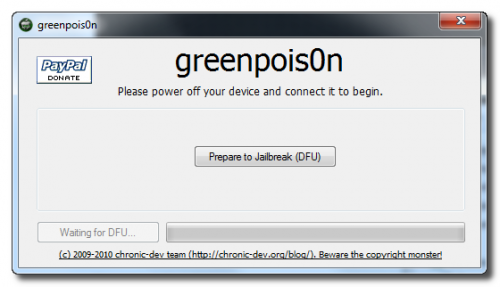
STEP 2: Connect your iPod to your computer via USB then launch Greenpois0n jailbreak application and hit "Prepare to Jailbreak (DFU)" button.
STEP 3: Follow the steps shown on the next screen shots to put your device in DFU mode.
  • Now you have to press and hold the sleep button for 2 seconds.

Jailbreak iPhone 3GS (New Bootrom), 3G, iOS 4.1 with Sn0wbreeze 2.0.2 [How to Guide]


Compatible devices & notes:
  • iPhone 2G — No Jailbreak Needed
  • iPhone 3G — No Jailbreak Needed
  • iPhone 3GS (old bootrom) — Requires you to be already jailbroken. (If you are the old bootrom on Spirit or JailbreakMe use Spirit2Pwn on http://repo.woowiz.net repo)
  • iPhone 3GS (new bootrom) — Requires you to be on 3.1.2
  • iPhone 4 — Wait for SHAtter exploit, and GreenPois0n jailbreak
  • iPod Touch 1G — No Jailbreak Needed
  • iPod Touch 2G (MB) — No Jailbreak Needed
  • iPod Touch 2G (MC) — Requires you to be on 3.1.2
  • iPod Touch 3G — Requires you to be on 3.1.2
  • iPod Touch 4 — GreenPois0n jailbreak
  • iPad — GreenPois0n jailbreak
So, if you are compatible, go ahead and follow our step by step guide to jailbreak your device using Sn0wbreeze 2.0 (Note: we used iPhone 3GS new bootrom in this guide)

Step 1: Download and install the latest version of iTunes.

Step 2: Now start iTunes and sync your iPhone with your PC so that it backs-up all your important data including settings, apps, music, contacts and photos.

Step 3: Download Sn0wbreeze 2.0.2 and the original iOS 4.1 firmware file (download links at the end of the page). Move all these to your desktop.

Step 4: Start Sn0wbreeze ( please note that when used Win Vista or Windows7 , you need to start your application in Administrator mode , by clicking the right mouse button on the icon and selecting "Run as administrator" ) and select “Expert Mode” for easy process, then click the blue arrow to continue.

Jailbreak iPhone 4, 3GS on iOS 4.1 with Greenpois0n [How to Guide]


STEP 1: Download Greenpois0n jailbreak (link at the end)

STEP 2: Connect your iPhone to your computer via USB then launch Greenpois0n jailbreak application and hit "Prepare to Jailbreak (DFU)" button.

How to: Jailbreak iPhone 4 on iOS 4 / 4.0.1 using JailbreakME 2.0


Now you can jailbreak any iPhone (including iPhone 4), iPod Touch or iPad on all Firmwares.
Steps:
Step 1: You just need Wi-Fi network, Navigate your Mobile Browser Safari to http://jailbreakme.com and then touch and slide to jailbreak.

Jailbreak iPad 4.2 iOS with Sn0wbreeze CONFIRMED


We are about to see iOS 4.2 that will satisfy all iPad users as it adds tons of new features including app-switch in background with new style. So, while we are waiting for iOS 4.2, iPhone hacker behind Sn0wbreeze has published a screenshot showing that he has managed to jailbreak iPad on iOS 4.2. In case you don't know, iOS 4.2 is still in beta releases, the latest one is beta 3 which brought lots of new features.
The screenshot above shows full root access using MobileTerminal on iOS 4.2 Beta 3 for iPad. Sn0wbreeze 2.1 will support the following devices (the same as PwnageTool 4.1 but for Windows):

Sn0wbreeze 2.1 Support All iOS 4.1 Devices [SCREENSHOTS]


Today is very important day in jailbreak community as we started this day by new Geohot's untethered exploit then PwnageTool 4.1 for Mac OS X screenshot and now iH8sn0w posts new screenshots of Sn0wbreeze 2.1 for Windows to support all iOS devices running iOS 4.1 (the same as PwnageTool but for Windows).

Sn0wbreeze 2.1 will bring support to the following devices:
  • iPhone 4, iPhone 3GS (new bootrom), iPhone 3G on iOS 4.1
  • iPad on iOS 3.2.2
  • Apple TV 2G on iOS 4.1
  • iPod touch 2G, 3G, 4G on iOS 4.1